
Ever been in a situation where you open the software to work and you see the following message on your computer screen: “Error 80070057: The parameter is incorrect.” And now you can’t even start your work! So in this situation, you must be wondering what to do & how to fix this. In this blog, we will discuss this issue. See, QuickBooks Error 80070057 usually indicates a network connection issue or file permission restrictions. This particular error often occurs due to corrupted QB installation files, ND files, incorrect file locations, or file extension issues. Most of the time, these complications can lead to difficulties with editing or accessing files, particularly in multi-user modes.
To prevent or resolve this error, it’s necessary to recognize early warning signs, such as the error message “The parameter is incorrect,” etc. Many QB users may also experience frequent system freezes or permission-related issues. So in this blog, we are not just going to discuss solutions but also causes, how, and why you’ll get answers for most of your queries here!
A Quick View Table – QuickBooks Error 80070057
| What is this error? | A type of error that indicates QB is unable to access the company file due to problems like network issues or insufficient permissions. |
| What are the causes? | This error is caused by corrupted files, improper file opening, connection issues, etc. |
| Methods to fix the issue | Moving the company file to its default location, running the QB file doctor, and manually resolving the error. |
Which Methods Should You Try To Resolve QB Error 80070057
Now, if you have tried those quick methods and are still seeing the QuickBooks 80070057 error, then it might be a different issue, so you need to fix it with proper solutions.
Solution 1: Move your Company File to the Default Location
The first core solution you can try is to move your company file to its default location if it is saved elsewhere. You need to perform the steps below to move the file.
- Firstly, close QuickBooks Desktop.
- Then, browse to the location of your company file.
- Right-click the company file (.QBW), then select Copy.
- The next step is to browse to the default location, right-click, and select Paste.
Location: C:/Users/Public/PublicDocuments/Intuit/QuickBooks/Company Files - Open QuickBooks, then click on Find a company file.
- Select Local Drives, then search for the company file name.
- Choose the correct file, then Open.
So this is the first core method that can resolve the QB error 80070057. If you are still encountering this issue, move to the next solution.
Solution 2: Use the QuickBooks File Doctor
The QuickBooks File Doctor can fix company file-related issues. It can identify and resolve file access problems. You can follow the steps below to fix the error:
- Firstly, download & Install the QuickBooks Tools Hub.
- Launch the Tools Hub and Click on Company File Issues.
- Run the QuickBooks File Doctor, then select your company file from the list.
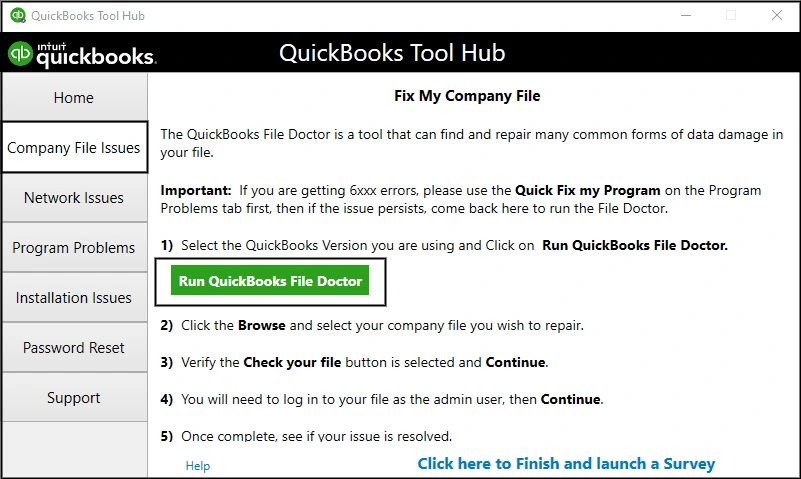
- Once the repair is complete, reopen the company file to check whether the issue is resolved.
Here is another solution: using this QB tool, you can resolve this issue quickly.
Solution 3: Manually Resolve Error 80070057
Step 1: Rename the.ND File:
- The first step is to browse to the location of your company file.
- Then, look for the corresponding.ND file of your company file.
Example: MyCompanyFileName.qbw.nd - Right-click the .ND file, then select Rename.
- Type in .old at the end of the file name.
Example: MyCompanyFileName.qbw.nd.old
Note: You may proceed to the next step if you are using QuickBooks in Multi-user Mode.
Step 2: Run the QuickBooks Database Server Manager on Your Server
- Check if you haven’t yet, download and install the QuickBooks Tool Hub
- In the tool hub, click Network Issues.
- Select QuickBooks Database Server Manager. If QuickBooks isn’t installed on your server, you’ll see a prompt to install it first.
- Inside the QuickBooks Database Server Manager, click on Start Scan if your company file folder(s) are displayed. If you can’t see file folders, browse to the location of your company file, then select Start Scan.
- Select Close.
This is one of the most effective solutions to fix the QB Error Code 80070057. Perform the methods mentioned above precisely.
What Things to Keep in Mind to Fix Error Code 80070057 in QuickBooks Desktop?
Now, before you start resolving the error in your QB software, just read this & go through these prerequisites.
- Just ensure that you have administrative privileges to make changes to files & settings.
- Ensure that your QB software is up to date to avoid compatibility issues.
- Your company file should be in a location that your QB software can access with full permissions.
- Verify that your system has a stable network connection, especially for multi-user setups.
- Just make sure to back up your company file before attempting any fixes.
Keep these prerequisites in mind before fixing QB Error 80070057.
QuickBooks Error Code 80070057: What is it and Why does it Happen?
QB error code 80070057 is a type of error that often appears as “The parameter is incorrect. ” It’s a kind of connectivity issue that happens when your QB software cannot access a company file. Most of the time, it happens due to permission restrictions, file extension problems, and network issues. This error commonly occurs when you try to open a file from another computer.
Now, let’s look at the reasons this error occurs.
- The error may occur when you don’t open your file properly.
- When you don’t give some users sufficient permissions, such as read/write/delete, on the folder containing the QB company file.
- It can also happen because of any damage.ND/TLG files. The Network Descriptor (.ND) or Transaction Log (.TLG) allows the software to access company files that may be damaged or corrupted.
- This error can happen, possibly due to multi-user network issues, when it fails to connect with the server hosting the company file.
These are some common reasons why this error appears on your computer screen. Knowing the reasons helps you understand the core of the issue.
What are Some Quick Ways to Fix QB Error Code 80070057?
There can be times when you don’t need to sit for half an hour just to resolve the issue of Error Code 80070057 in QuickBooks. There might be minor things you need to change that are causing this error in your software. Before we dive into solutions, you can also try some quick, easy steps to continue working in QuickBooks.
- Open your file correctly: Your problem may occur if you aren’t opening the file properly. In this scenario, you can avoid this issue by simply opening it the right way.
- Open QuickBooks Desktop.
- Then choose the company file you want to open.
- Lastly, click on Open.
- Firstly, update your QB software: You may continue to face this error if you’re using an older version. Check if you haven’t updated QB. Make sure to update it to the latest version first. Updating the software will also help you access the latest features and fixes you might need.
- Try using software with admin permissions: This error may not occur if the software has enough permissions. Follow the steps:
- First, close QuickBooks Desktop.
- Then, right-click the QuickBooks icon.
- Then, just select Run as Administrator.
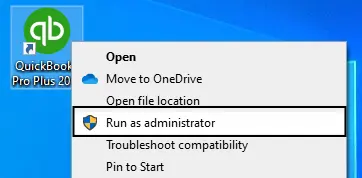
- Now, if your company file didn’t open automatically, choose the company file, then select Open.
Try these quick solutions to ensure basic updates and settings are perfect. You don’t need to panic. Maybe the issue can be resolved by just trying these fixes.
Conclusion
QuickBooks Error 80070057 can feel like a major issue, but we have covered the causes and solutions in this blog. It’s rarely about the loss of data. Most of the time, it’s mainly a gap between software and system permissions. You can try these quick fixes first; if they don’t work, jump to the core methods to resolve this issue.
Frequently Asked Questions
What are the Causes of QuickBooks Error 80070057?
A communication gap between QB and your company file is the main cause of QB Error 80070057. It occurs due to insufficient permissions, network connection issues, damaged files, etc.
What Tools can help in fixing QuickBooks Error Code 80070057?
The software includes tools such as QuickBooks File Doctor and QB Database Server Manager, which can help you resolve QB Error 8007005. QB File Doctor can scan issues & repair many file and network-related problems.
What are some methods to fix QB Error 80070057?
You can fix QuickBooks Error Code 80070057 by methods like moving your company file to its default location, running QB File Doctor, and resolving the error by renaming.ND file, run the QuickBooks Database Server Manager on Your Server.
Does QB Error Code 80070057 mean your financial data is lost?
No, Error Code 80070057 QuickBooks is related to a communication gap between QB and the company files, not your data. Your records are safe.
How can you quickly resolve error code 80070057 in QuickBooks?
You can quickly resolve QB Error 80070057 by reopening the file properly, updating the software to the latest version, and running QB as an administrator.
You May Read Also-
Get Rid of QuickBooks Error: The File You Specified Cannot Be Opened
QuickBooks MAPI Keeps Asking for Password [Fixed]
7 Tested Ways to Tackle QuickBooks Direct Deposit Not Working
Fixing QuickBooks Update Service Pop Up Won’t Go Away Issue
Windows Firewall is Blocking QuickBooks Desktop: How to Prevent It

James Richard is a skilled technical writer with 16 years of experience at QuickBooks Data Migration. His expertise covers data migration, conversion, and desktop errors for QuickBooks. He excels at explaining complex technical topics clearly and simply for readers. Through engaging, informative blog posts, James makes even the most challenging QuickBooks issues feel manageable. With his passion for writing and deep knowledge, he is a trusted resource for anyone seeking clarity on accounting software problems.