
QuickBooks offers a service called “direct deposit” through which you can transfer payments directly into your employees’ bank accounts. This reduces the risk of printing or writing paychecks and saves you a lot of time. However, due to issues with QuickBooks direct deposit not working, payments may be delayed or not go through at all. So it’s important to fix these issues in a timely manner.
In this blog, we’ll learn about this problem in detail and give you guided solutions so you can get rid of this error with no trouble.
A Quick View Table – QuickBooks Direct Deposit Not Working
Let’s quickly discuss the crucial points that we have mentioned in this blog:
| What is the QuickBooks direct deposit not working issue? | When you make a direct deposit, there are 2 cases: it either gets delayed or is rejected for various reasons, or it cannot go through. |
| Causes of this issue | The reasons for this issue are that you have not set up your direct deposit in the right way, have an inactive QB Payroll subscription, or are not using the latest QB and QB Payroll versions. Additionally, the company bank account might not have been checked or linked, the employee bank details are wrong, or you don’t have a strong internet connection. Another reason is that you might not be logged into QB as an admin. |
| How to resolve this issue? | You can resolve this issue by setting up direct deposits correctly, updating the QB application and QB Payroll, verifying your banking information, checking your employee’s banking information, ensuring you have activated QB direct deposit, and verifying if the payday falls on a federal holiday. |
Solutions to Fix the Direct Deposit Not Working in QuickBooks
You can easily fix the direct deposit not working issue by performing the step-by-step solutions. Check out the methods given below:
Solution 1 – Check the Bank Account Info
If the bank account is not verified by Intuit, you may encounter a QuickBooks direct deposit error. You need to connect your account to Intuit, which will make withdrawals of less than $1.00 to check it within 2-3 banking days. When the transaction amount is ready, perform the steps mentioned below:
- First, you need to open QB.
- Then, sign in to the Admin account.
- Next, go to the Employees section.
- Choose the My Payroll Service option.
- Hit the Activate Direct Deposit option.
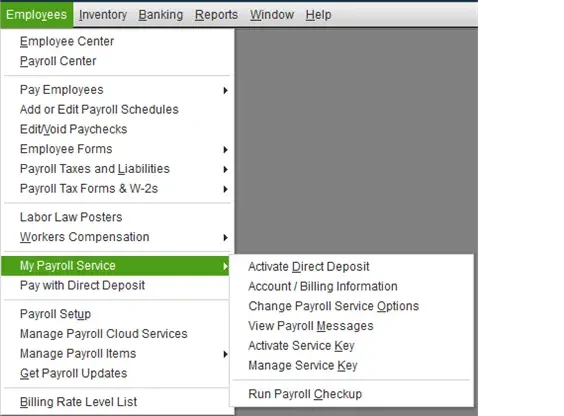
- You need to sign in to the Intuit account.
- Type the debit amount twice.
- Hit the Verify button.
- Type the payroll PIN.
- Choose the Submit option.
- Choose the OK option.
However, if you cannot see the Activate Direct Deposit option, you must follow the steps given below:
- Start by opening the Employees tab.
- Then, click on Manage Payroll Cloud Services.
- Wait till it loads completely.
- Now, close it.
Follow the steps given above again to check the bank account. Once the account gets checked, you will be able to pay the employees by using direct deposit.
Solution 2 – Set Up QB Direct Deposit Correctly
You may face the QuickBooks Direct Deposit Not Working issue due to improper setup. Ensure that this feature is activated in the QB payroll by following the steps covered below:
- First, go to the Employees section in QuickBooks Payroll.
- Then, choose Employee Center and open the employee list.
- Next, double-click on the employee’s name for whom you need to set up direct deposit.
- Choose the Payroll Info tab.
- Select the Direct Deposit option under the Direct Deposit button.
- Now, you will get an option to deposit the paycheck in more than one account.
- So, select accordingly.
- After that, give your employee bank details, including bank name, account number, and routing number.
- Select the type of account.
- Finally, press OK.
If you are still encountering QuickBooks payroll direct deposit not working, move to the next troubleshooting method.
Solution 3 – Update the QB and Payroll
The outdated version of the QB software is one of the main reasons why you encounter QuickBooks direct deposit issues. It is crucial to update QuickBooks Desktop and QuickBooks Payroll to their most recent version to prevent QuickBooks Direct Deposit Not Working error.
What are the Different QB Direct Deposit Issues and How to Address Them?
Here, we will discuss the specific problems that you might face while using QuickBooks direct deposit:
Scenario 1: Facing Issues in Making a Direct Deposit in QB for the First Time
If you are making a direct deposit for the first time, you might encounter some QB direct deposit problems and get an error message, including:
“XX’s check will not be directly deposited because the first set of paychecks is still in the process of completion. You will need to issue manual checks for the net amount calculated for this employee.”
This error can be quickly fixed by following the steps given below:
- First, delete all of the direct deposit paychecks.
- Then, make all the direct deposit paychecks again.
- Lastly, accept all the direct deposit paychecks.
- NOTE: This is only applicable for users who are making direct deposits in QB for the first time.
This is the ideal fix for your issue. Now, let’s move to another direct deposit issue you may face.
Scenario 2: Direct Deposit is Taking a Lot of Time
If the direct deposit is taking a lot of time, you must contact the employee’s bank account and verify the payroll status, then perform the following instructions before moving on to the steps:
- First, check if the payday falls on a federal holiday.
- Verify the direct deposit lead time.
If the issue is caused by the above reasons, you must wait for the DD to get processed in a few business days. If not, perform the steps mentioned below:
- First, open the Employees menu.
- Choose the Send Payroll Data option.
- Look for the payroll data confirmation in the Items Received section.
- Then, choose the payroll confirmation you want to see.
- Hit the View option to see the confirmation details.
After checking, talk to the bank representative. They can tell you the reason behind the delayed QB direct deposit. They can also let you know when the payroll will be posted.
Scenario 3: QB Direct Deposit May Not Be Going Through
If the QB direct deposit isn’t going through, the following points could be the reasons behind it:
- The employee’s bank account info is not accurate.
- You submitted the direct deposit payroll after 5 PM PST.
- The employee’s bank account might be facing problems.
Once you resolve these issues, the settlement is completed in 2-3 business days. If it takes more than this time, you must contact the bank for assistance.
Scenario 4: The Direct Deposit Has Been Done From the Wrong Account Info
One of the main QuickBooks Direct Deposit Not Working problems are when the direct deposit has been done to an employee with wrong banking details. You must be dealing with two different cases in this issue. Here, we will discuss both:
The Direct Deposit Made Which Account Belongs to Another Employee
- You must speak to the owner of the account the amount was debited to, and initiate a refund through an internal agreement.
- Edit the direct deposit bank account of the employee.
The Account/Routing Number is Wrong
You must speak to the bank to verify the status of the said account:
- You have to immediately start a direct deposit reversal if the account you directly deposited to is live.
- It is crucial to speak to the bank to see if the payroll is rejected if the account is closed or non-existent.
What Leads to QuickBooks Direct Deposit Not Working Issue?
Here, we will discuss the reasons why you are encountering a QuickBooks Direct Deposit Not Working issue:
- The QuickBooks Payroll subscription isn’t active anymore.
- You haven’t set up the direct deposit in a correct way.
- The company bank account hasn’t been checked or linked.
- You are not using the most recent QB and QB Payroll versions.
- The employee’s bank details are not entered correctly.
- You are not logged into QB as an Admin.
- You don’t have a strong internet connection.
Go through these points, and you can simply avoid the issue.
Conclusion
In this blog, we discuss the QuickBooks Direct Deposit Not Working in detail. We covered the reasons why you encounter this issue. Also, we mentioned the solutions to resolve it and different scenarios that you might face while making a direct deposit.
Frequently Asked Questions
What will happen if the QB’s direct deposit fails?
You will get the funds in the business account you used to make the deposit in some business days if the QB direct deposit fails.
How much time does the QB direct deposit take?
The duration of QuickBooks direct deposit highly depends on the receiver’s bank account, i.e., the employee or the independent contractor. It usually hits the employee’s bank account from midnight to the early morning of the payday.
How can I reverse a direct deposit in QB?
You can request a DD reversal in QB by ensuring that it is completed within business days from the payday. However, the retrieval funds aren’t ensured. You have to request a direct deposit reversal in QB by paying a $75 fee. You can do that by opening the Direct Deposit Reversal Form, selecting Add Request, entering the needed info, and pressing Save.
You May Also Read-
Easy Depositing Undeposited Funds in QuickBooks
QuickBooks Error 50004: Activate Direct Deposit with Ease
Recording a Deposit in QuickBooks Desktop and Online: Step by Step Guide
Fixing QuickBooks Update Service Pop Up Won’t Go Away Issue
No Option in QuickBooks Automatic Update Greyed Out [Fixed]

James Richard is a skilled technical writer with 16 years of experience at QuickBooks Data Migration. His expertise covers data migration, conversion, and desktop errors for QuickBooks. He excels at explaining complex technical topics clearly and simply for readers. Through engaging, informative blog posts, James makes even the most challenging QuickBooks issues feel manageable. With his passion for writing and deep knowledge, he is a trusted resource for anyone seeking clarity on accounting software problems.